Findings
Findings are the main output of a scan, but they are not meant to be accepted blindly. Treat each finding as a security claim with evidence attached.
The report sorts findings by severity score so the highest-impact claims are visible first. Your triage process should then consider confidence, evidence, business context, and remediation cost.
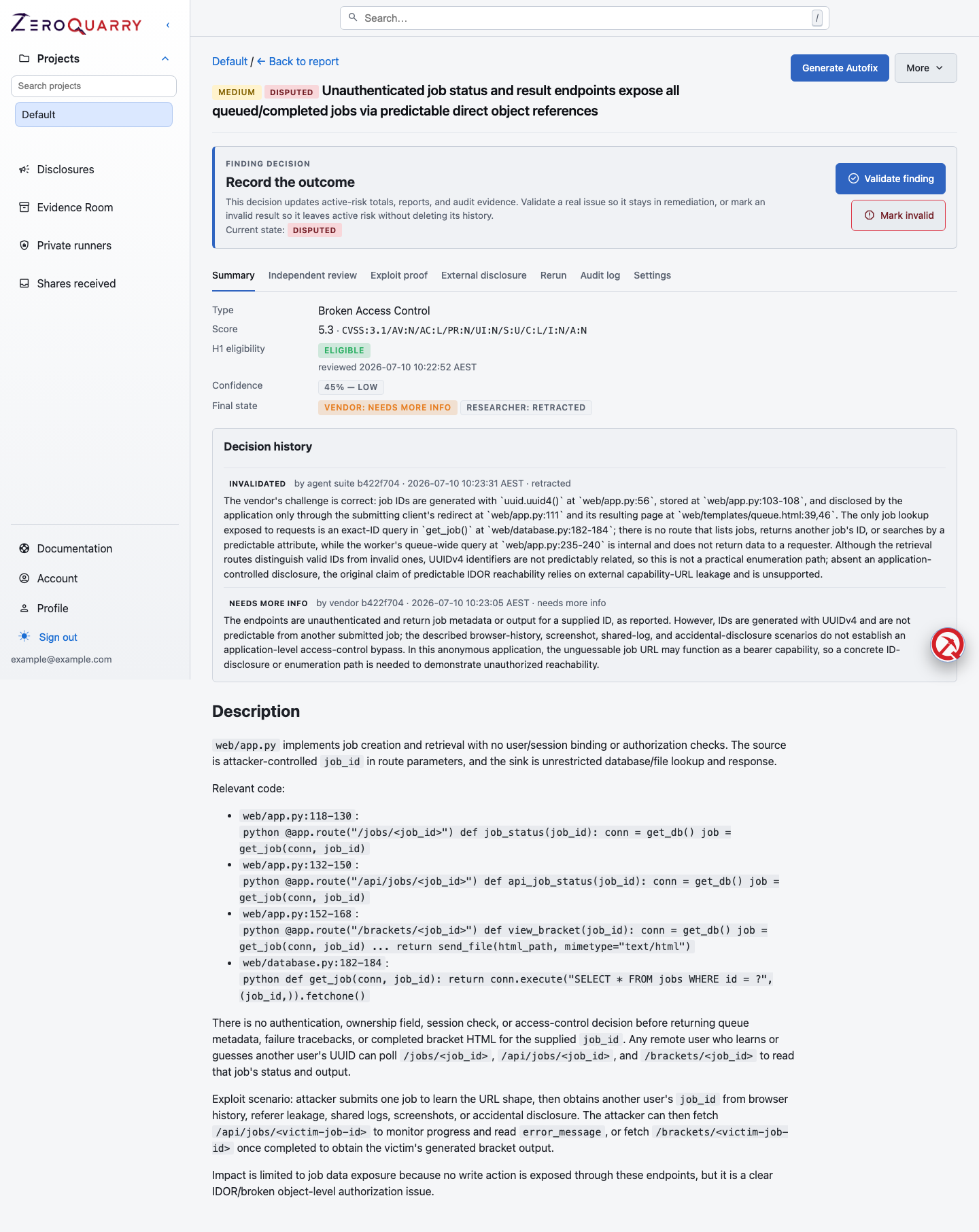
Finding detail is where severity, confidence, evidence, exploit proofs, exports, and downstream actions come together for one security claim.
Finding fields
| Field | Meaning |
|---|---|
| Title | Short issue name. |
| Severity | Critical, high, medium, low, or info. |
| Severity score | Numeric score used for sorting. |
| CVSS vector | CVSS v3.1 base vector when the agent produced one. |
| Confidence | Probability-like score from ZeroQuarry review signals. |
| Vulnerability type | The issue class, such as SSRF or authorization bypass. |
| Source | File, line, URL, binary artifact, or other evidence location. |
| Description | Technical explanation and impact. |
| CVE references | Related known-vulnerability references when applicable. |
| Lifecycle state | The team's current decision, backed by append-only history. |
Record the decision
New results begin as candidates. After review, use the finding controls to move the issue through validation, mitigation, retest, accepted risk, dispute, or archive. Decisions that close or contest a finding should include enough reason for a future reviewer to understand the product context.
Lifecycle state is different from severity and confidence: it records what the team decided to do. Read Finding lifecycle and audit trail.
Exploit proofs
When artifact generation is enabled, each finding can include an exploit proof (proof of concept). Proofs vary by mode:
- source scans usually reference code paths and reproduction steps
- binary scans may include artifact evidence and reproduction guidance
- remote scans may include HTTP requests or payload sequences
The proof's code is downloadable directly from the finding page, and when a
finding supports a full deployment reproduction, ZeroQuarry can generate a
deployment package — a .zip with a containerized stack and seed scripts
that reproduces the issue end to end. Account owners can also state a preferred
PoC language under Account, which the artifact agent uses as a default when
the vulnerability does not dictate one.
Treat exploit proofs as starting points for validation. Review them before running them against sensitive systems.
How to review a finding
For each important finding:
- Read the source, URL, artifact path, or other evidence location.
- Confirm the affected asset and environment.
- Check the severity rationale and CVSS vector.
- Review confidence and independent-review signals.
- Validate the exploit proof or ask for a safer reproduction path.
- Decide whether to fix, challenge, accept, disclose, or monitor.
Use Triage to remediation for the full workflow.
Finding chat
Each finding has its own chat thread, rendered like a conversation. Use it to:
- ask why the issue is exploitable
- request a more concise remediation summary
- ask for a exploit proof in a different language or format
- challenge the finding as a false positive
- ask the model to revise the title, severity, or description
The assistant can revise findings and reports mid-conversation: when a chat answer changes the finding, the update appears in place, and the tool activity for each step stays visible so you can see what the agent did. Pick a different model for the conversation from the chat model picker when you need one.
Finding discussions can continue for multiple review rounds. If the model revises the finding, confirm the updated title, severity, description, exploit proof, and lifecycle decision before exporting it.
Good finding-chat prompts are specific:
Explain this as a Jira ticket for the team that owns project membership.
What evidence would disprove this finding?
Rewrite the reproduction steps for a staging environment with two test users.
Coverage notes
Reports may include coverage notes. These are areas the researcher examined without recording a vulnerability. They help explain where the assessment spent time, but they are review evidence rather than a guarantee that an area is free of vulnerabilities.
Next action
- Use Auto-fix pull requests for source findings that need an engineer-reviewable code change.
- Use Jira, ServiceNow, and GitHub Issues to hand work into the owning team's system.
- Use Verification tests to record — and prove — what happened after the fix.
- Use Secure sharing when an external recipient should see only selected findings.