Remote target scans
Remote scans actively probe a running web application, API, or SaaS endpoint. Use them only for systems you own or have explicit permission to test.
Remote scans are for vulnerabilities that require runtime behavior: routing, sessions, deployed configuration, API gateway behavior, redirects, server-side fetching, CORS, role state, and real HTTP responses.
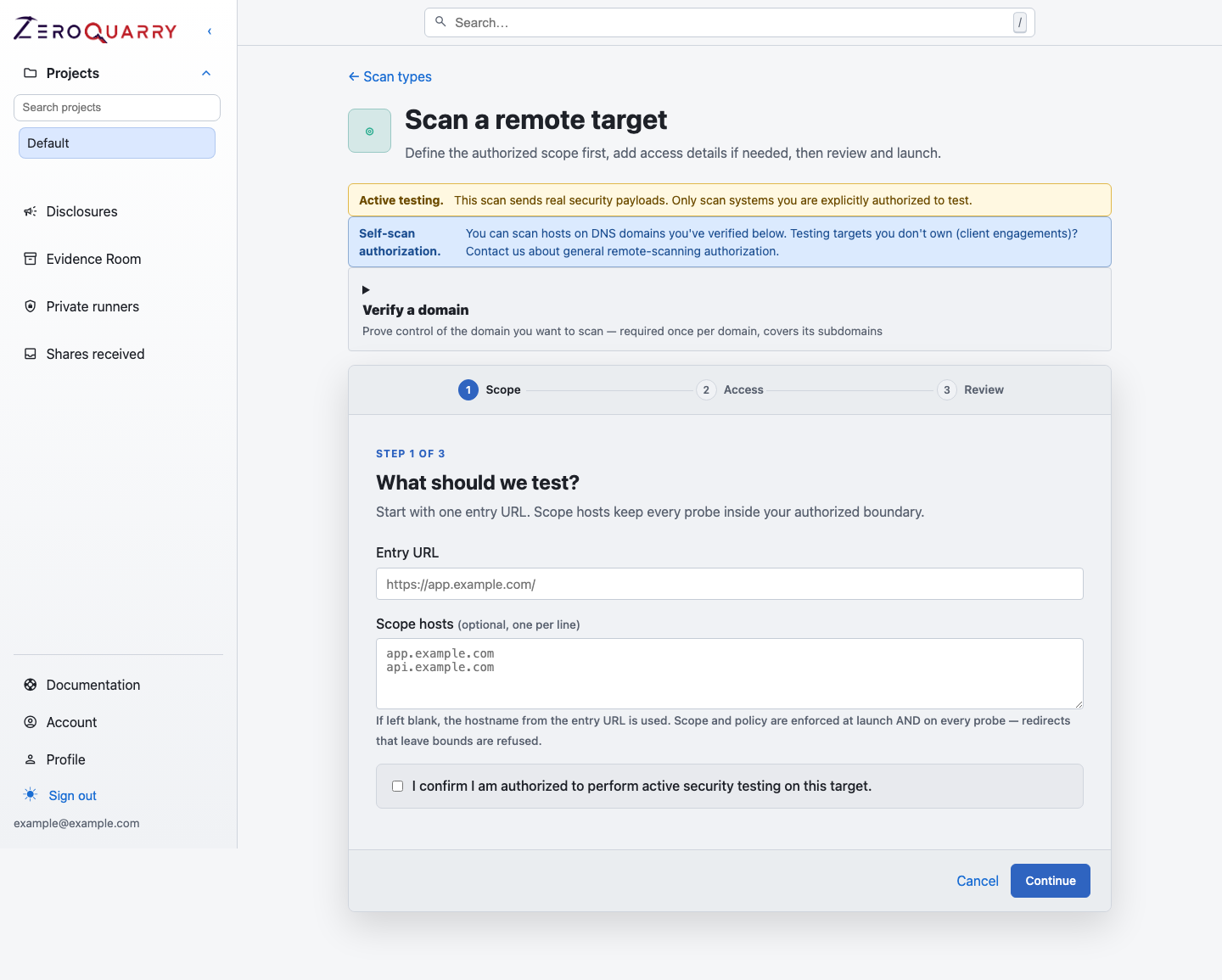
The first wizard step defines the authorized target boundary before any access details or advanced scan settings are reviewed.
Remote scans send real HTTP payloads for classes such as SQL injection, XSS, SSRF, path traversal, and authentication flaws. Unauthorized scanning may violate computer-misuse laws and program rules.
Inputs
The Scope step requires:
- an entry URL
- scope hosts
- an authorization confirmation
If the project already has a URL asset, the form pre-fills the entry URL, scope hosts, and any authentication stored on the asset, and the scan is linked back to it. Assets scanned by a remote assessment collect their coverage history on the asset detail page.
If you do not enter scope hosts, ZeroQuarry uses the entry URL host. Scope hosts limit where agents should send probes.
Treat scope hosts as a safety control, not documentation. Add every approved host explicitly when a workflow crosses subdomains, APIs, or CDN-backed routes. Scope and policy are enforced at launch and re-checked on every probe — a redirect that leaves the approved hosts is refused.
The Access step is optional for public targets. It collects required identification headers, cookies or API authentication, HTTP Basic credentials, and form-login details in separate controls.
ZeroQuarry Cloud rejects loopback, link-local, RFC1918, and internal-DNS targets. Enterprise accounts can test authorized internal applications from a customer-controlled network by selecting an approved private runner for the project. The private runner changes reachability; it does not relax the authorization or scope requirement.
Black-box or grey-box
The project's profile signals the testing posture, and the scan form follows it:
- Black-box projects test from the outside with no credentials — the way an anonymous attacker would. Keep the asset library free of auth for these.
- Grey-box projects test with partial inside context: test-account credentials, architecture documentation, or internal endpoints. Store the credentials on the project's URL assets so every scan authenticates the same way.
The profile does not change what the scanner can technically do — it changes what the workspace sets up and signals to everyone reading the reports.
When remote scans are the right tool
Use a remote scan when you need to test:
- IDOR and authorization flaws in a running application
- SSRF reachability and outbound request behavior
- XSS, SQL injection, path traversal, and parser payload handling
- API gateway or reverse-proxy behavior
- deployed headers, redirects, CORS, cookies, and session state
- bug-bounty or staging targets where active probing is authorized
Prefer source or binary scans when you are not authorized to send traffic, the target is fragile, or you only need static evidence.
Required headers
Some bug bounty programs require identifying headers on every request, such as
X-HackerOne-Handle, X-Bugcrowd-Ninja, or X-Researcher.
Use Required headers for these values. ZeroQuarry attaches them to every probe, including form-login setup. Required header names and values are shown in scan logs so you can verify compliance.
Authentication and access
Remote scans can attach authentication context to probes:
| Method | Use it for |
|---|---|
| Cookies | Browser session cookies copied from developer tools. |
| Custom headers | Bearer tokens, API keys, or app-specific headers. |
| HTTP Basic auth | Targets protected by Basic auth. |
| Form login | A one-time login request that obtains session cookies before probing. |
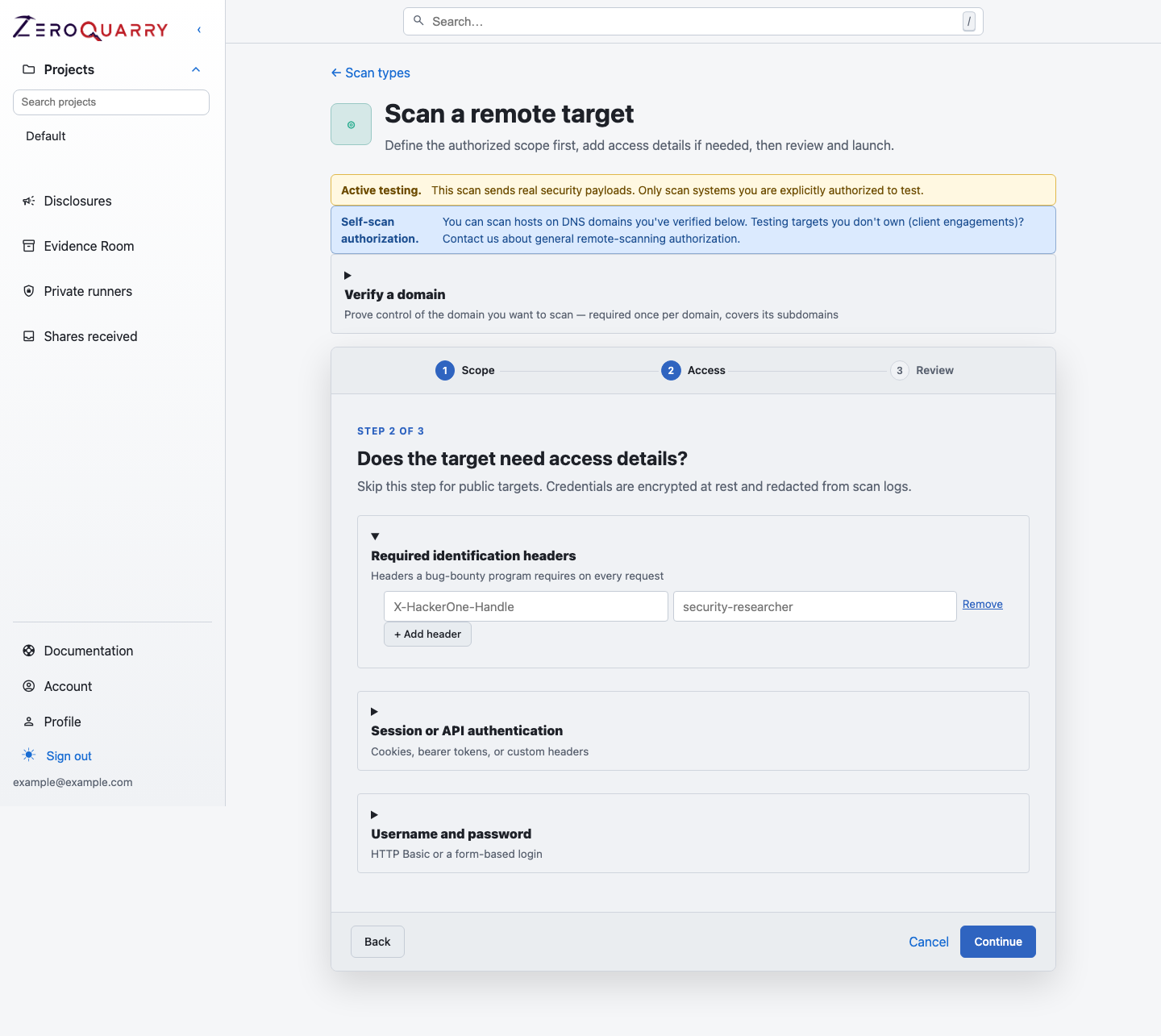
Public targets can skip access details. Authenticated assessments can add only the mechanism required by the approved test account.
When the target is saved as an asset with auth, the scan reuses it — no need to re-enter credentials per scan.
Sensitive authentication values are redacted from scan logs. They are still sent to the LLM agent as scan context and to the target as HTTP headers or cookies. Use authentication only with LLM providers and target environments you are comfortable exposing to that data.
Authenticated testing strategy
For authorization bugs, one credential is often not enough. Consider running separate scans for:
- unauthenticated user
- low-privilege user
- normal customer or tenant admin
- internal support role
- cross-tenant test accounts
Name and tag each scan so the report makes the tested role obvious. Never use production administrator credentials unless that is explicitly approved for the test.
Safe scoping
Before queueing a remote scan:
- use a staging or test environment when possible
- include every in-scope host explicitly
- exclude third-party infrastructure that is not in scope
- add required program headers
- avoid production-only credentials unless they are approved for testing
- use notes to describe fragile endpoints, rate limits, or program rules
Remote scans run with an internal rate limit so probing stays polite on shared or production-adjacent targets. Record tighter program limits in the notes so agents keep their distance.
Blind finding confirmation
To confirm vulnerabilities that give no visible response (blind SSRF, XXE,
out-of-band exfiltration), remote scans use ZeroQuarry-operated callback
infrastructure: your target is guided into fetching a unique
bin.zeroquarry.com URL or resolving a unique name under
oob.zeroquarry.com, and the observed callback becomes attached evidence.
When a callback is observed, the finding is reported as confirmed; when it is
not, the finding reports the best callback-free observation instead. Tell
your target's security team to expect traffic to these domains — see
Scan infrastructure domains.
Scan settings
The Review step exposes focus, model, coordinator-budget, Batch API, HackerOne, independent-review, notification, and execution controls when the account tier and workflow mode permit them. Guided modes may apply entitled review defaults without showing each advanced control.
For internal targets, the scan form also shows Execution environment when the project allows a compatible private runner pool. Private jobs remain pinned to that pool and never fall back to ZeroQuarry Cloud automatically.
Review remote findings
Remote findings should be reviewed for:
- exact request sequence
- target account, role, and environment
- whether payloads were destructive or read-only
- response evidence and status codes
- whether required headers were attached
- whether a source or binary scan can explain the root cause
For externally reported issues, move from the finding to External disclosure workflow.
Example notes
Authorized staging target. Keep probes non-destructive. Focus on IDOR in
/api/accounts/* and SSRF in the import-url feature.
Bug bounty target. Required headers are configured. Only test app.example.com
and api.example.com.