ZeroQuarry overview
ZeroQuarry is an AI security-operations platform for teams that need more security coverage than their headcount can provide. It turns product context and software assets into a repeatable operating loop:
- Receive work from engineering, scheduled reviews, or forwarded security reports.
- Assess the right surface: source code, a shipped binary, or an authorized live target.
- Decide what is real using evidence, adversarial review, finding states, and a recorded audit trail.
- Move remediation into engineering through patches, auto-fix pull requests, Jira, ServiceNow, or GitHub Issues.
- Verify the fixes with recheck scans, verification tests, and third-party attestation.
- Prove the work happened with issued evidence snapshots, reports, controlled shares, disclosures, and an account-wide Evidence Room.
The assessment layer covers the assets teams actually ship and operate:
- source code repositories and uploaded source archives
- binary artifacts such as Android packages, JARs, firmware, installers, and archives
- authorized live targets such as web applications, APIs, and SaaS assets
The primary UI is the ZeroQuarry console at
console.zeroquarry.com. Programmatic access is
available through the public API gateway at https://api.zeroquarry.com.
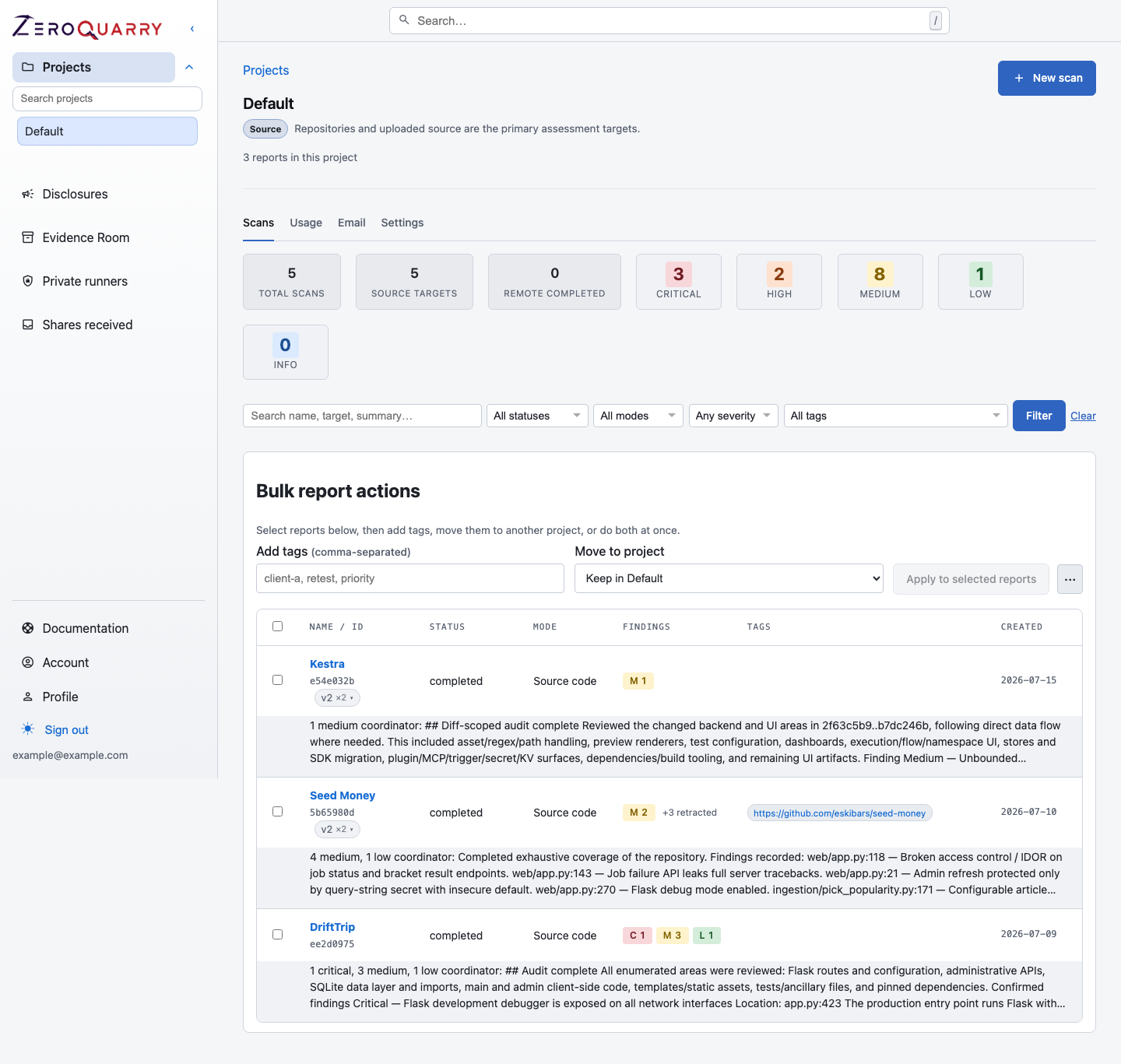
The console opens into your projects. Each project carries a profile that declares what kind of assessment it is and which scans it can run.
New accounts start with a short workflow-mode setup step. This lets ZeroQuarry tailor the scan UI for a guided owner/operator experience, a security-research workflow, or an AppSec triage workflow before the first scan is created.
Why teams use ZeroQuarry
Use ZeroQuarry when software is changing faster than a human security team can manually inspect it, or when the company is not yet ready to staff every security specialty internally.
Common use cases:
- Release security review: scan a release branch, shipped artifact, and staging target before promotion.
- Continuous CI scanning: trigger source scans from CI and use delta scans to focus on changed code, or schedule lineage-aware rescans independently of CI.
- Inbound report handling: forward researcher or customer security reports into a project-specific inbox, constrain what may be scanned, and turn valid targets into assessment work.
- Triage and remediation: challenge findings, record accountable lifecycle decisions, generate fix patches or pull requests, and re-run after fixes.
- Verification and attestation: check fixes with automated re-checks and verification tests, or hand the baseline to an external attestor for third-party sign-off.
- External disclosure: prepare exploit proofs, disclosure drafts, HackerOne review context, and a disclosure timeline.
- Customer and audit evidence: issue immutable evidence snapshots, package the latest evidence for selected assets, or share only the findings a recipient should see.
- Multi-surface assessment: combine source, binary, and remote scans when a vulnerability crosses build, packaging, and runtime boundaries.
Start with Build a security operating rhythm if you are deciding where ZeroQuarry fits in your company. Use Choose the right assessment if the outcome is clear and you are deciding what to scan first.
Core concepts
Projects group work for one product, service, repository, or target set. Every project carries a profile — source code, black-box, grey-box, white-box, or custom — that declares what kind of assessment it is and which scan modes it can launch. Use projects to preserve history across source, binary, and remote reviews of the same product.
Assets are the durable record of a project's targets: URLs, repositories, hosts, API specs, and documentation. Scans pre-fill from assets, discoveries flow back into the library as pending candidates, and an approval gate decides what future scans may touch.
Scans are asynchronous security assessments. A scan has one mode: source, binary, or remote. Scans move through states such as queued, running, awaiting batch artifacts, completed, failed, or cancelled.
Findings are confirmed or candidate vulnerabilities recorded by the agents. Each finding includes severity, CVSS-style scoring, confidence, evidence, and source context where available.
Artifacts are generated outputs attached to findings, including downloadable proof-of-concept code, generated patches, deployment packages, and, when enabled, a draft disclosure email.
Reports are the durable review surface for a scan. Reports include findings, coverage notes, target metadata, logs, discussions, exports, re-run controls, and an audit log of analysis and finding-state changes.
Finding states record the human decision around a vulnerability, from candidate and validation through mitigation, retest, accepted risk, or archive. They are append-only decisions, not just mutable labels.
Evidence snapshots are immutable, integrity-hashed designations of a completed report — the point-in-time baseline that verifications and attestations are anchored to.
Verification tests pair a baseline snapshot with automated recheck results and human outcomes (fixed, partially fixed, not fixed, unable to verify, accepted risk) and publish an immutable verification report.
Attestation engagements hand a baseline to an external attestor — a user of another ZeroQuarry account — whose per-finding verdicts and sign-off seal an independently attested report.
Shares expose only selected findings to a named recipient through an expiring, password-protected, read-only link.
The Evidence Room is the account-wide home for issued evidence snapshots, engagements, verification tests, and per-target report history. It can combine the latest report for selected assets into one PDF.
Disclosures track externally reported issues across acknowledgement, fix, public advisory, bounty, credit, and closure.
How scans work
ZeroQuarry uses a coordinator and worker model.
- The coordinator maps the target surface and builds a checklist.
- Worker agents investigate focused areas, files, endpoints, or binary outputs.
- Triage reviews recorded findings and filters weak or duplicate issues.
- Artifact generation creates exploit proofs, patches, and disclosure drafts when the plan allows it.
- Optional review passes can add HackerOne eligibility labels, independent challenge results, rebuttals, and confidence scores.
The result is a report that is intended to be actionable: evidence first, reproducibility where possible, and enough context for an engineer or security reviewer to decide what to do next.
How to read these docs
If you are planning a security program, start with a playbook:
- Build a security operating rhythm
- Release security review
- Continuous CI scanning
- Handle inbound security reports
- Triage to remediation
- Customer assurance and audit evidence
- External disclosure workflow
If you already know what asset you want to scan, go straight to the scan mode:
If you are new to the console, start with Run your first scan, then read Projects and scans and Project assets to understand how work stays organized.
For automation, choose GitHub Actions, scheduled rescans, or email triage based on what should create the work.