Connect private repositories
ZeroQuarry can read private repositories through a connected GitHub App or an account-level HTTPS or SSH credential. Choose the narrowest access method that supports the repositories you need to scan.
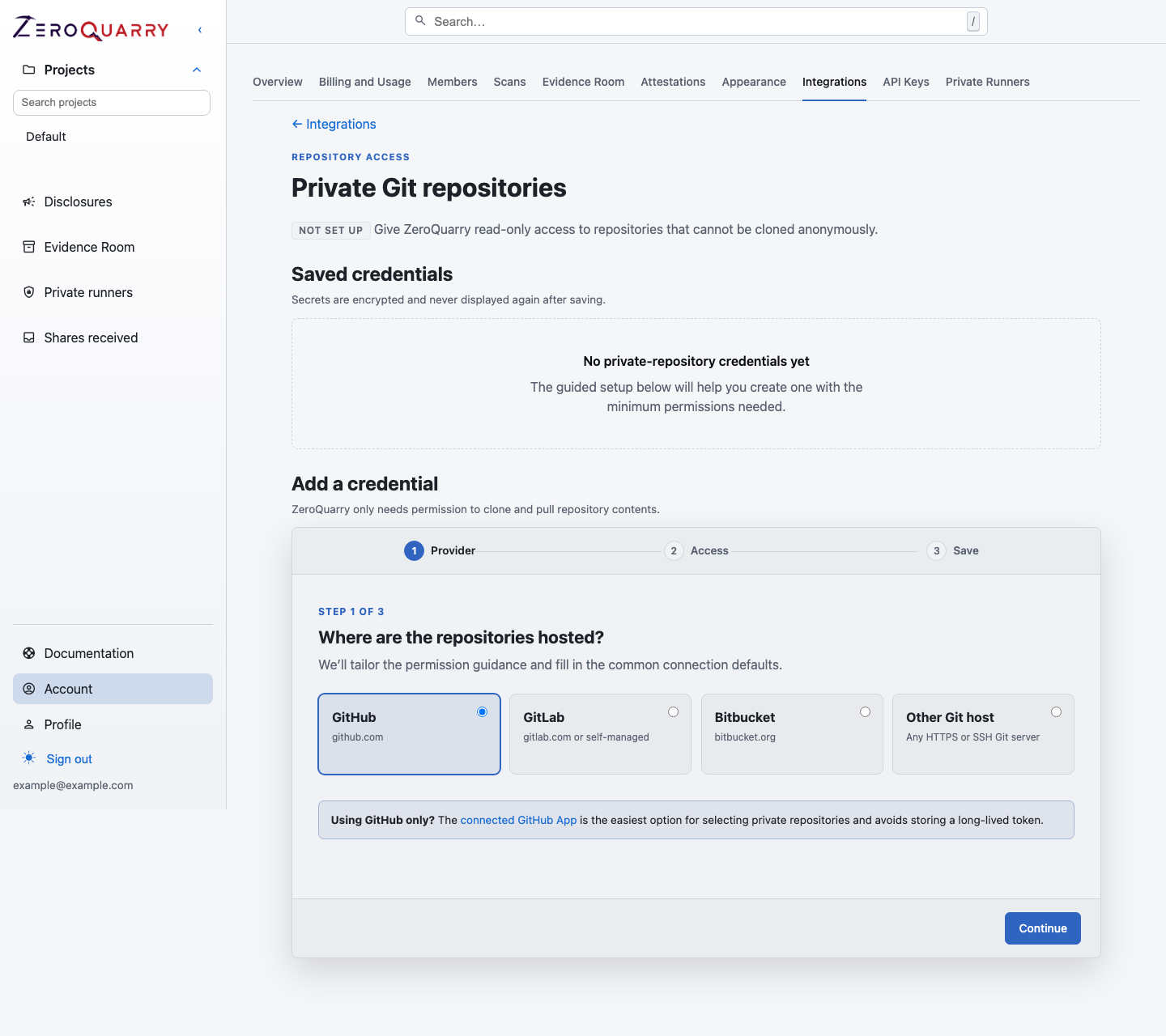
The guided setup starts with the Git provider, then tailors its least-privilege instructions before saving any credential.
Choose an access method
| Method | Prefer it when | Credential behavior |
|---|---|---|
| Connected GitHub App | The repositories are on GitHub and can be shared with the app | Select repositories already granted to the installation without storing a long-lived personal token. |
| HTTPS credential | You use GitLab, Bitbucket, another Git host, or a GitHub token is required | ZeroQuarry stores an encrypted, host-matched token and uses it only for clone operations. |
| SSH deploy key | The account tier enables SSH and the repository supports deploy keys | Store a private key in ZeroQuarry and add the matching public key to the repository with read-only access. |
For GitHub, start with the connected GitHub App. Use a saved credential when the app is not appropriate for the repository or deployment model.
Connect the GitHub App
- Open Account > Integrations.
- Connect the ZeroQuarry GitHub App.
- In GitHub, grant access only to the repositories ZeroQuarry should read.
- On a new source scan, choose Connected GitHub repo and select one or more available repositories.
The source scanner uses the installation to clone selected repositories. ZeroQuarryBot remediation access is a separate integration and permission path.
Add an HTTPS or SSH credential
Open Account > Integrations > Git Private Repositories and complete the three-step setup:
- Provider — choose GitHub, GitLab, Bitbucket, or another Git host.
- Access — choose HTTPS or SSH where available and follow the displayed provider-specific permission guidance.
- Save — name the credential and confirm the exact Git host.
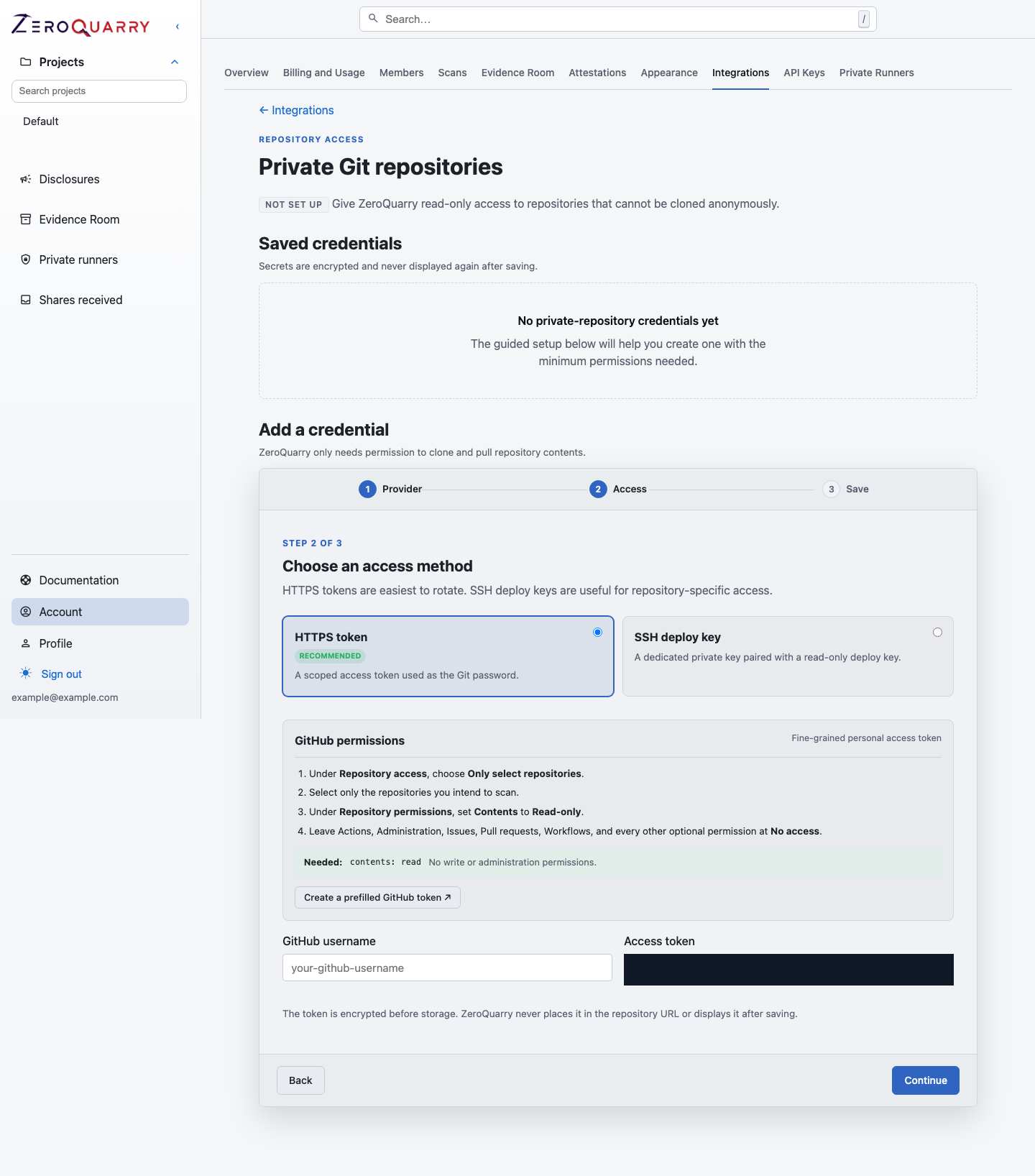
The access step translates each provider's permission model into the minimum clone-only scope ZeroQuarry needs.
Minimum permissions:
| Provider | Recommended access |
|---|---|
| GitHub | Fine-grained token limited to selected repositories with Contents: Read-only. |
| GitLab | Project access token or deploy token with read_repository only. |
| Bitbucket Cloud | Repository-scoped token with repository Read only. |
| Other Git hosts | Clone, pull, or source-read access only; no push, admin, webhook, issue, or pipeline permissions. |
For SSH, add the public key as a read-only deploy key and leave write access disabled. Add known-hosts data when your deployment policy requires pinned host keys.
Use a saved credential
On a new source scan:
- Choose Add Git URLs.
- Enter repositories whose host exactly matches the saved credential.
- Select the credential under Private repository credential. When exactly
one saved HTTPS credential covers every target host, ZeroQuarry selects it
automatically — including for API-created scans that omit
git_credential_id.
In the API, include git_credential_id:
{
  "mode": "source",
  "git_urls": ["https://github.com/example/private-repo.git"],
  "git_credential_id": "credential-uuid"
}
Security and operations
- Use one host and saved credential per scan.
- Use least-privilege repository tokens.
- Prefer repository-scoped tokens or read-only deploy keys over account-wide personal tokens.
- Revoke credentials that are no longer used.
- Rotate credentials after a suspected leak.
Credential values are encrypted and never displayed again after saving. ZeroQuarry uses them for a temporary clone; it does not use saved clone credentials to push commits or open pull requests.
Cloned repository contents are still part of the scan workspace and may be sent to the configured LLM provider during analysis.
Keep source inside a customer-controlled network
Enterprise accounts can assign Git source scans to a private runner. The runner clones the repository directly from the customer network and calls the selected LLM provider with the account-managed provider key.
Private-runner source scans require Git URLs. File and archive uploads are not accepted because those inputs would first need to pass through the SaaS control plane. Saved Git credentials are delivered in the authenticated job manifest for the attempt and removed from the runner's local job database when execution ends.
Continue with Set up a private runner.