Set up a private runner
This guide connects a customer-controlled Docker host to ZeroQuarry, makes its runner pool available to selected projects, and verifies that scan creators can choose it.
Before starting, read Private runners to confirm that the network, result boundary, and supported scan types match your use case.
Prerequisites
You need:
- an Enterprise account with private runner pools enabled
- an account owner or admin
- a Docker host inside the network the scans must reach
- outbound HTTPS access to the ZeroQuarry control plane, selected LLM providers, and any Git hosts used by source scans
- an account-managed API key for every selected scan, review, and artifact model
No inbound connection from ZeroQuarry SaaS is required.
1. Create a runner pool
Open Account > Private Runners and complete the three-step setup:
- Network — name the network or trust boundary, such as
Production VPC,Melbourne Lab, orCustomer staging. - Scans — allow remote targets, Git source scans, or both.
- Data — confirms the result-return policy. Pools return full results: findings, descriptions, exploit proofs, review history, logs, and generated artifacts reach ZeroQuarry so the normal report and evidence workflows work. The source code the runner clones stays inside your network.
Create separate pools anywhere you would use different firewall rules, access controls, or trust boundaries.
2. Enroll the Docker host
After the pool is created, ZeroQuarry displays a masked Docker command and checks the pool automatically while the token remains active.
- Open a terminal on the Docker host.
- Copy and run the generated command.
- Wait for the page to show the runner as online.
The enrollment token works once and expires after 24 hours. If it expires or is rejected, select Add runner to generate a new command.
The command:
- starts the published
zeroquarry/workerimage - records affirmative acceptance of the worker EULA
- uses
--restart on-failure:5for bounded startup retries - stores the enrolled worker identity in a named Docker volume
Keep the command private while its token is active.
3. Preserve runner state
The Docker volume stores the enrolled worker ID and secret. Preserve it when updating or recreating the container. Deleting the volume removes the enrolled identity and requires a new enrollment command.
A permanent enrollment rejection exits without an endless restart loop. Create a new command before restarting a container whose one-use token was rejected.
4. Allow the pool on a project
Pools are not automatically available to every project.
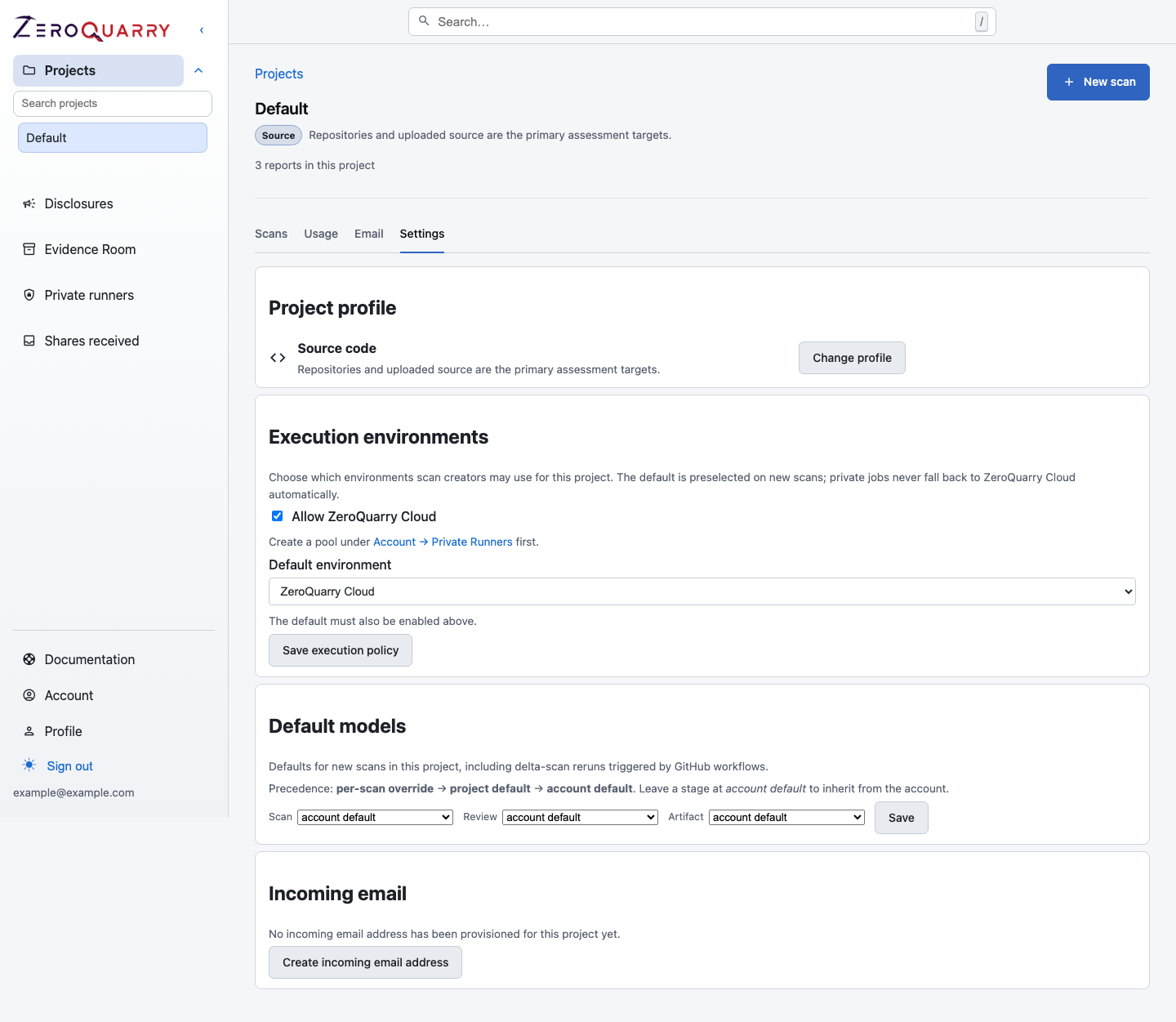
- Open the project and select Settings.
- Under Execution environments, enable ZeroQuarry Cloud, one or more compatible private pools, or both.
- Choose the project default.
- Save the execution policy.
The default is preselected on new scans, but scan creators can choose another allowed compatible environment. A private job never falls back to ZeroQuarry Cloud automatically.
5. Queue a compatible scan
Private runners support:
- Git-backed source scans
- authorized remote-target scans
Browser source uploads, archives, and binary uploads continue to use ZeroQuarry Cloud. Private source scans require Git URLs because uploading through the browser would send the input through the SaaS control plane first.
If the project allows a compatible pool, select it under Execution environment on the review step of the scan wizard.
Verify the setup
Before relying on the pool for time-sensitive work, confirm:
- the runner is online and reports a current version
- the Docker host can reach the intended internal target or Git host
- all selected model stages resolve to account-managed provider keys
- the project allows the pool for the intended scan type
- the result policy matches the data boundary approved for that network
Continue with Operate private runners.