Secure sharing
Secure shares give a named external recipient read-only access to selected findings without giving them a ZeroQuarry account or the rest of the scan.
Use a share when collaboration needs live finding detail and controlled access. Use an export when the recipient needs a static file for their own records.
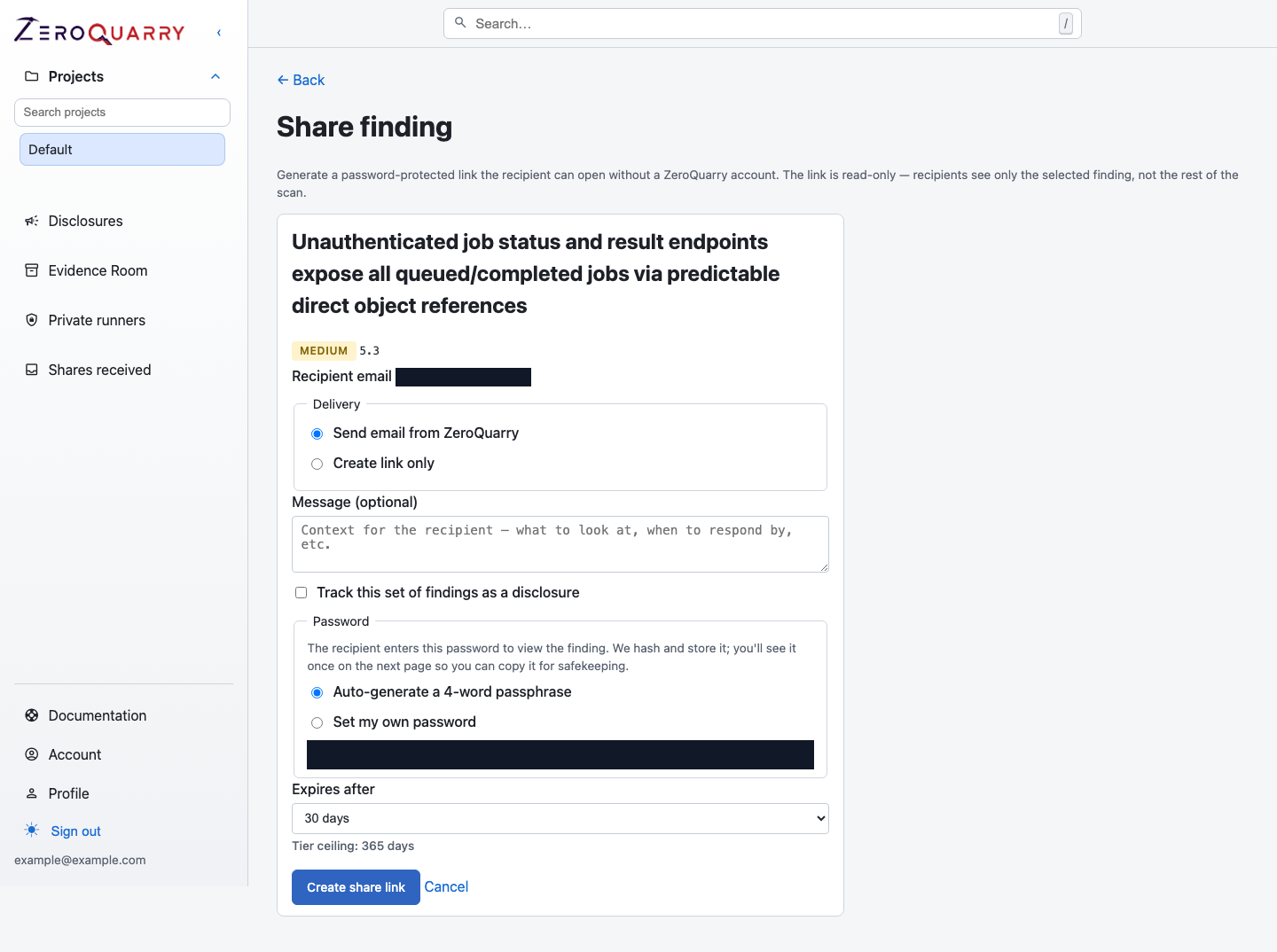
A share is scoped before creation: recipient, selected findings, delivery, password, disclosure tracking, and expiry are explicit choices.
Create a share
- Open a finding, or select multiple findings from one report.
- Choose Share.
- Enter the recipient email address.
- Choose delivery:
- Send email from ZeroQuarry sends the link and context.
- Create link only lets you deliver it through your own channel.
- Add a short message explaining the requested action.
- Choose an automatically generated four-word passphrase or set a custom password of at least eight characters.
- Choose an expiry within the ceiling allowed by the account tier.
- If disclosure tracking is available, optionally create disclosure records for the shared findings.
The password is shown once after creation. Store or deliver it according to your organization's secret-sharing policy.
Recipient access
The recipient opens the tokenized link and enters the password. The page shows only the findings included in the share and is read-only.
If the recipient signs in to a ZeroQuarry account that uses the same email address the share was sent to, the password gate is skipped — sign-in itself proves they are the intended recipient. Those shares also collect under Shares received in their sidebar (see below).
Share tokens are stored as hashes. Password checks are rate-limited, and access events are recorded. A share can be active, expired, or revoked.
Shares received
Recipients with a ZeroQuarry account get a Shares received inbox in the sidebar once someone shares findings with their email address. It lists every share addressed to that email — sender, finding count, sent date, and expiry — separated into active and closed. Opening a share there skips the password gate and shows the same read-only view as the tokenized link.
This is convenience, not an extra permission: it only surfaces shares that were already sent to the account's email address.
Manage shares
Open Shares to review:
- recipient
- number of included findings
- active, expired, or revoked state
- recorded view count
- expiry
- creator
Revoke an active share when the review ends, the recipient changes, or the link may have been exposed. Revocation invalidates the link immediately.
Existing shares remain visible and revocable for audit purposes even when the account can no longer create new shares.
Sharing checklist
Before creating a share:
- validate the findings and current lifecycle states
- select only the minimum findings the recipient needs
- check source, exploit proof, authentication, and chat content for sensitive data
- use the shortest practical expiry
- deliver the password separately if required
- name the expected action and response date in the message
A secure share controls access to selected ZeroQuarry content. It does not prevent an authorized recipient from copying what they can view.