Evidence Room
The Evidence Room is the account-wide home for proving security work. Reports normally begin with a scan; the Evidence Room begins with the actual target that was assessed, and adds the artifacts that make work provable to people outside the team: issued evidence snapshots, attestation engagements, and verification tests.
Use it to answer "what is the latest security evidence for these systems?" without manually assembling individual report files — and to anchor that evidence so it cannot quietly change later.
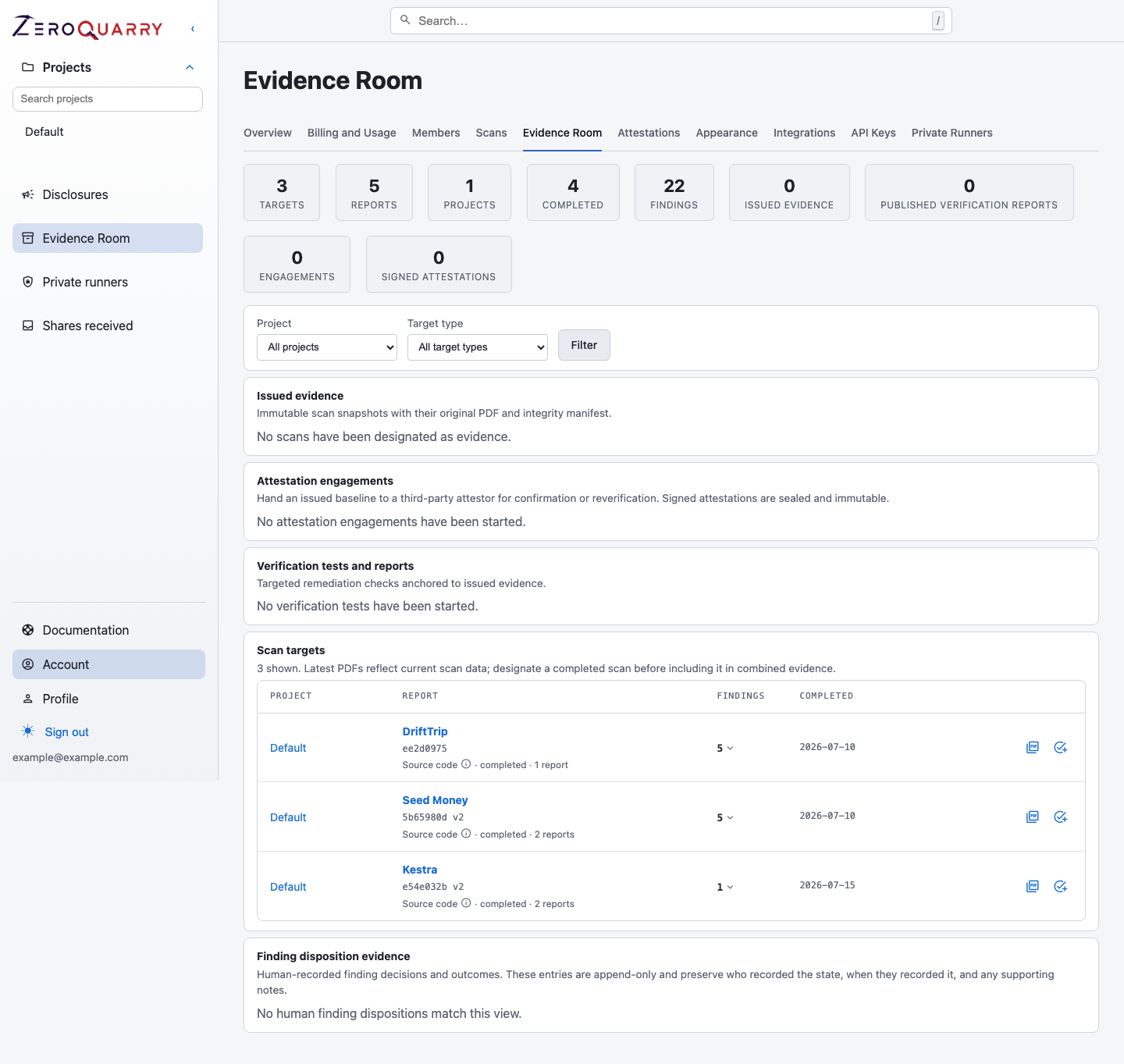
One view carries the snapshots, third-party engagements, verification tests, and the per-target report inventory.
What the view contains
Open Account > Evidence Room to see:
- totals for targets, reports, projects, completed scans, findings, issued evidence, verification reports, engagements, and signed attestations
- Issued evidence: immutable snapshots with their original PDF and integrity manifest
- Attestation engagements: third-party reviews anchored to a baseline, with per-engagement progress and status
- Verification tests and reports: remediation checks anchored to issued evidence, with progress and outcome summaries
- Scan targets: every target with its latest report, finding counts (including critical and high), and completion date
- Finding disposition evidence: the append-only record of human decisions — who recorded each state, when, and with what note
You can filter the target inventory by project or target type.
Issue evidence (snapshots)
Select Designate as evidence on a completed report to issue a snapshot. ZeroQuarry freezes the finding set, targets, and report context into a canonical manifest with SHA-256 integrity hashes and stores the exact PDF bytes. The snapshot — and its report — cannot be modified afterwards; tampering is detected, not hidden.
Issued evidence is the anchor for everything downstream: a verification test checks fixes against a baseline, and an attestation engagement hands the baseline to a third party.
Download the latest report for one target
Use Latest PDF on a target row. ZeroQuarry resolves the latest report for that exact normalized target and produces the account's current pentester-style PDF.
This is useful for a focused customer request or an internal service review.
Build a combined evidence PDF
- Filter the view to the relevant project or target kind.
- Select the targets — or issued snapshots — in scope.
- Choose Download PDF.
- ZeroQuarry selects the latest report (or the frozen findings of each chosen snapshot) and combines the target context and findings into one evidence pack.
The selection is capped by the export limit shown in the console. For a large asset inventory, create several coherent packs rather than one unreviewable document.
Configure the organization name
The account's evidence-report organization name is used in the combined document. Report branding, watermark, disclaimer, and finding definitions are resolved from the account tier and platform settings at export time.
Freshness and interpretation
The Evidence Room packages the latest available report per selected target. It does not claim that:
- every product asset is represented
- the latest report is recent enough for a specific control
- all findings are resolved
- the account complies with a framework
Before sharing, check the completion dates, target scope, important finding states, and whether a full or changed-code assessment produced the report. Snapshots remove the "did the data change?" question; they deliberately do not answer "is the data current?".
For the audience and delivery workflow, read Customer assurance and audit evidence.