Scheduled rescans
Scheduled rescans provide baseline coverage when a repository does not have a reliable CI integration or when you want an independent security cadence.
A schedule belongs to a scan lineage, not one historical scan. On each due run, ZeroQuarry checks the latest Git target for changes. If the commit has not moved, it records a no-change skip instead of spending a scan on identical source.
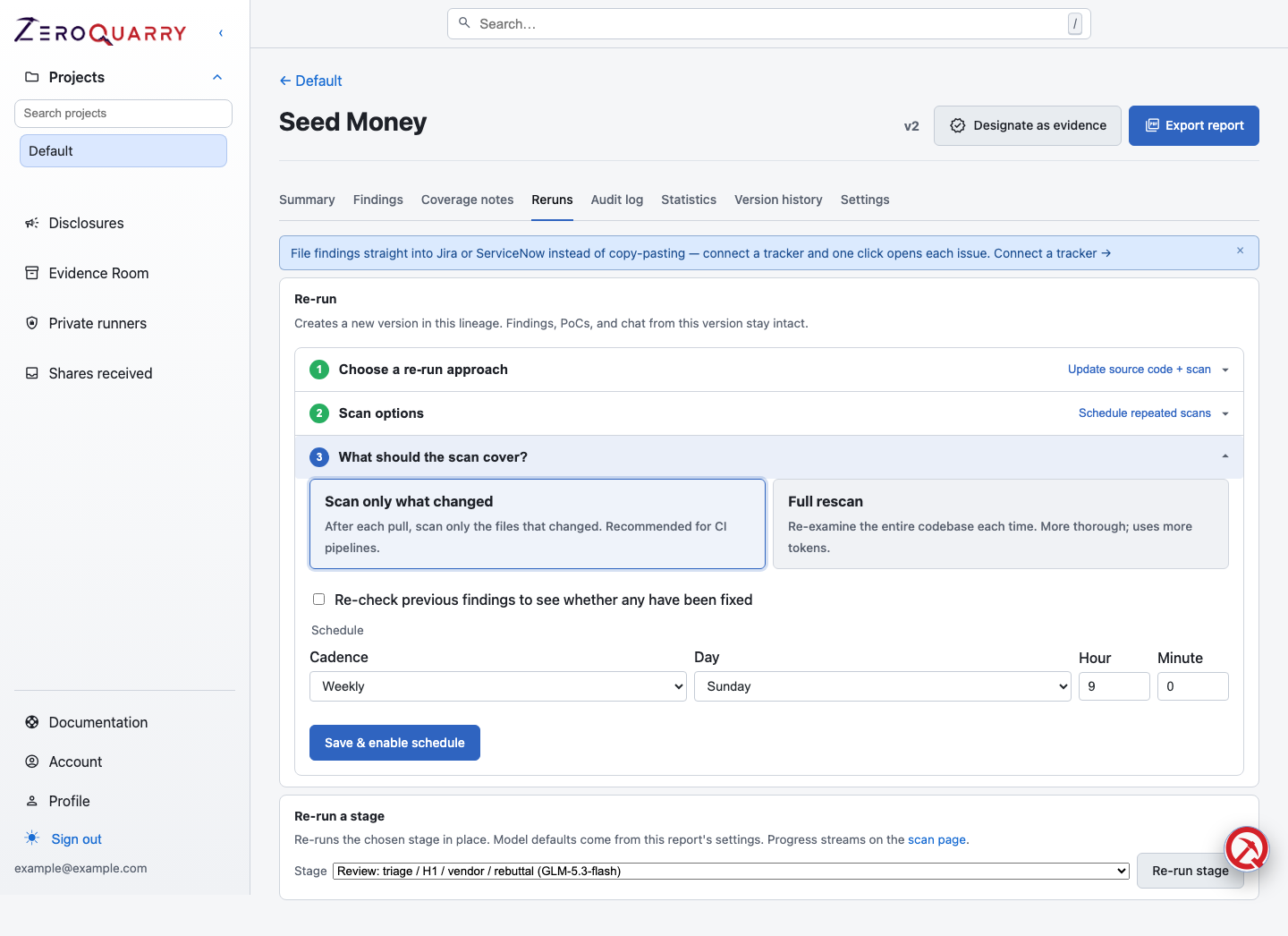
The schedule is configured from the report's Reruns tab, alongside one-off re-runs and per-stage re-runs.
When to use a schedule
Use a scheduled rescan for:
- weekly coverage of an important repository
- a monthly control independent of individual developer workflows
- repositories maintained by a vendor or separate engineering system
- services where main-branch changes are a better trigger than every pull request
Use GitHub Actions when the scan must be associated with a specific pull request or CI decision.
Create a schedule
- Complete a Git-backed source scan. The baseline provides the lineage, repository checkout, and prior commit.
- Open its report and select the Reruns tab.
- Under Choose a re-run approach, pick Update source code + scan.
- Under Scan options, pick Schedule repeated scans.
- Under What should the scan cover, choose:
- Scan only what changed — uses the Git diff to focus the next scan while still allowing the agents to follow nearby data flow. Recommended for frequent schedules.
- Full rescan — re-examines the entire codebase each time. More thorough; uses more tokens.
- Enable Re-check previous findings when the run should explicitly test unresolved findings from the lineage.
- Set the cadence (daily, weekly, or monthly), day, and time of day, then Save & enable the schedule.
Schedules run on a fixed clock, so a weekly schedule lands on the same time every week. Schedules are available only for source/Git lineages because those targets provide a reliable commit-change signal.
Interpret schedule outcomes
The schedule records its last run and one of these outcomes:
ran: a new scan version was createdskipped_nochange: the repository commit had not changedfailed: the repository could not be updated or the rescan could not start
A no-change skip is a successful control outcome. A repeated failure needs investigation, usually around Git credentials, repository availability, or worker health. Upcoming runs are visible to operators in the agent inbox calendar view.
Verify previous findings explicitly
A broad or changed-code scan can discover the same issue again, but absence is not proof that an earlier finding was fixed. Enable Re-check previous findings on a one-off update or schedule when remediation verification is part of the goal.
The report records one explicit outcome for each eligible previous finding:
- Fixed: the recheck found evidence that the issue is no longer present.
- Still present: the vulnerable behavior or code path remains.
- Inconclusive: the available target, context, or evidence could not support either conclusion.
These outcomes are shown separately from newly discovered findings and link back to the previous occurrence. They can also be imported straight into a verification test when the result needs to become shareable evidence. If rechecks were requested but no outcomes were recorded, inspect the scan log; do not mark findings fixed from silence.
Set the right cadence
| Change profile | Starting cadence |
|---|---|
| High-risk service with frequent changes | Daily changed-code scan plus periodic broad review |
| Normal product repository | Weekly changed-code scan |
| Low-change internal or vendor component | Monthly broad review |
Avoid making every scheduled scan a release gate. Use schedules for coverage; use release or CI workflows for time-sensitive decisions.
Keep the schedule healthy
- Preserve the Git credential used by private targets.
- Review the latest run status after credential rotation or repository moves.
- Keep the source clone available if the schedule depends on updating it.
- Disable the schedule when the product or repository is retired.
- Run a fresh baseline when the target set changes materially.